SSR Http Interceptors guide to set cookies in request headers
Usually, within an Angular application without Server Side Rendering, during authentication, the necessary information for authenticating API calls is configured in the browser, such as a token or credentials.
The challenge we face in an SSR application is that browser storage is a client-side mechanism, thus disconnected and inaccessible in many cases. Although Angular provides functionalities to perform checks like the isPlatformBrowser function, which returns a boolean indicating whether the platform id is a browser or not, and it's straightforward to use:
import { Component, Inject, PLATFORM_ID } from '@angular/core';
import { isPlatformBrowser } from '@angular/common';

@Component({
  selector: 'app-my-component',
  templateUrl: './my-component.component.html',
  styleUrls: ['./my-component.component.css']
})
export class MyComponent {

  constructor(@Inject(PLATFORM_ID) private platformId: Object) {
    if (isPlatformBrowser(this.platformId)) {
      console.log('Questo codice è eseguito solo nel browser.');
    }
  }

}
But now, imagine needing to configure the headers of all API calls after authentication with, for example, a token. If the application weren't SSR, within the app.config file, you would simply take the token values and pass them to the API configurations. However, as we mentioned, in some files, like app.config, we don't have access to browser storage. And this is where interceptors come into play.
Interceptors
In an Angular application, if we need to perform operations on all HTTP requests and responses (like adding an authorization header), an Interceptor provides a clean and centralized way to do so. The advantage is that it allows our components to maintain their logic without having to modify the code. Below is an image showing where Interceptors fit into the calls.
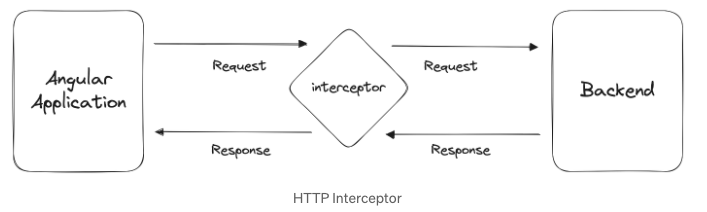
The key concept of Interceptors is that they offer an efficient solution by intercepting all HTTP calls originating from our frontend and configuring necessary headers if needed. This centralized mechanism eliminates the need to configure multiple calls separately and ensures configurations are applied in the right place.
Implementing Interceptors
First of all, create the http.interceptor.ts file.
├── app
│   ├── app.component.css
│   ├── app.component.html
│   ├── app.component.spec.ts
│   ├── app.component.stories.ts
│   ├── app.component.ts
│   ├── app.config.server.ts
│   ├── app.config.ts
│   ├── app.routes.ts
|	├── interceptors
|	│   └── http.interceptor.ts
Inside, implement the interceptor. Before retrieving the actual token value, check whether the browser is rendered using isPlatformBrowser:
import { Inject, Injectable, PLATFORM_ID } from '@angular/core';
import {
  HttpEvent,
  HttpInterceptor,
  HttpHandler,
  HttpRequest,
} from '@angular/common/http';
import { Observable } from 'rxjs';
import { isPlatformBrowser } from '@angular/common';
import { CookieService } from 'ngx-cookie-service';

@Injectable()
export class HttpRequestInterceptor implements HttpInterceptor {
  constructor(
    @Inject(PLATFORM_ID) private platformId: any,
    private cookieService: CookieService
  ) {}

  intercept(
    req: HttpRequest<any>,
    next: HttpHandler
  ): Observable<HttpEvent<any>> {
    if (isPlatformBrowser(this.platformId)) {
      const cookie = this.cookieService.get('currentToken');
      if (cookie) {
        req = req.clone({
          setHeaders: {
            Authorization: `${cookie}`,
          },
        });
      }
    }
    return next.handle(req);
  }
}
The next step is to inject it using the provider array in the app.config file. Providers are a set of instructions for Angular's Dependency Injection system.
import {
  APP_INITIALIZER,
  ApplicationConfig,
  importProvidersFrom,
} from '@angular/core';
import { provideRouter } from '@angular/router';
import { appRoutes } from './app.routes';
import { provideClientHydration } from '@angular/platform-browser';
import {
  HTTP_INTERCEPTORS,
  HttpClientModule,
  provideHttpClient,
  withFetch,
} from '@angular/common/http';
import { EnvService } from './env.service';
import { WindowRef } from './window.service';
import { ConfigService } from './config.service';
import { ApiModule, Configuration, ConfigurationParameters } from '../api';
import { HttpRequestInterceptor } from './interceptors/http.interceptor';

export function apiConfiguration(): Configuration {

export const appConfig: ApplicationConfig = {
  providers: [
    provideClientHydration(),
    provideRouter(appRoutes),
    provideHttpClient(withFetch()),
    importProvidersFrom(HttpClientModule,
    {
      provide: HTTP_INTERCEPTORS,
      useClass: HttpRequestInterceptor,
      multi: true,
    },
  ],
};
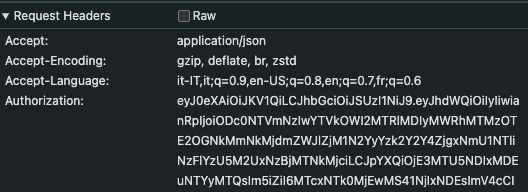
Now, simply, if a "current token" is saved in the cookies after authentication, it will automatically be present in the headers of all HTTP calls to the APIs.